Skills — 可复用的 Agent 能力包
在 GitHub 编辑此页工具(Tools)是原子操作——搜索一次、读一个文件、调一次 API。但有些能力需要的不是一次操作,而是多步骤工作流 + 领域知识 + 模板资源的组合。比如”按照团队规范做代码审查”、“查阅 LangGraph 最新文档并据此回答”、“生成符合公司格式的技术报告”——这些需要的不是一个工具,而是一整套流程指导。这就是 Skills 要解决的问题。
Skills 是什么?
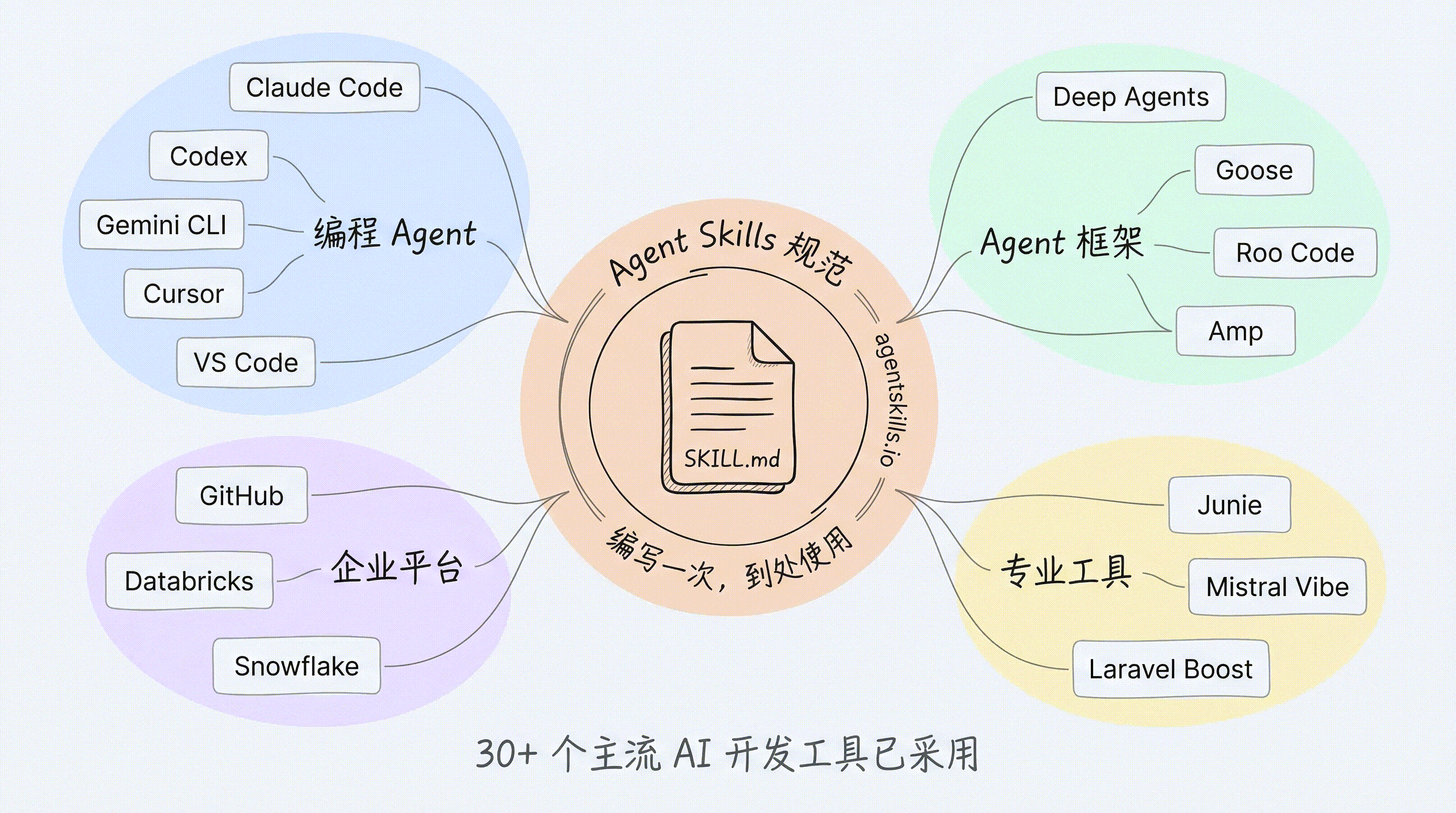
一个 Skill 就是一个目录,核心是一个 SKILL.md 文件,加上可选的脚本、参考文档和模板资源。Skills 遵循开放的 Agent Skills 规范(Agent Skills Specification),这不是 Deep Agents 的私有概念,而是一个已被广泛采纳的行业标准。
截至 2026 年,30+ 个主流 AI 开发工具已采用 Agent Skills 规范:
| 类别 | 代表产品 |
|---|---|
| 编程 Agent | Claude Code、OpenAI Codex、Gemini CLI、Cursor、VS Code |
| Agent 框架 | Deep Agents、Goose、Roo Code、Amp、Letta |
| 企业平台 | GitHub、Databricks、Snowflake、Spring AI |
| 专业工具 | JetBrains Junie、Mistral Vibe、Laravel Boost、Qodo |
这意味着:编写一个 Skill,可以在所有兼容产品中使用。团队积累的领域知识不再锁定在某个工具里。
类比:Skills 之于 AI Agent,就像 npm 包之于 Node.js——一个标准化的能力分发和复用机制。
规范定义的目录结构
skills/
└── langgraph-docs/
    ├── SKILL.md              # Required: metadata + instructions
    ├── scripts/              # Optional: executable scripts
    │   └── fetch_docs.py
    ├── references/           # Optional: detailed docs
    │   ├── api-patterns.md
    │   └── style-guide.md
    └── assets/               # Optional: templates, data files
        ├── report-template.md
└── schema.json| 目录 | 用途 | 加载时机 |
|---|---|---|
SKILL.md | 元数据 + 核心指令 | Frontmatter 启动时加载;正文匹配时加载 |
scripts/ | 可执行脚本(Python、Bash、JS 等) | Agent 按指令需要时执行 |
references/ | 详细参考文档(API 模式、风格指南等) | Agent 需要深入信息时按需读取 |
assets/ | 模板、数据文件、schema 等静态资源 | Agent 需要时按需读取 |
SKILL.md 的结构
每个 Skill 的核心是 SKILL.md 文件,由两部分组成:YAML frontmatter(元数据)和 Markdown body(指令正文)。
YAML Frontmatter
Frontmatter 定义了 Skill 的身份和约束条件。规范定义的字段如下:
| 字段 | 必填 | 说明 |
|---|---|---|
name | Yes | 小写字母、数字、连字符组成,1-64 字符。必须与父目录名一致。 |
description | Yes | 描述 Skill 的功能和适用场景。最大 1024 字符。 |
license | No | 许可证名称 |
compatibility | No | 环境要求(如需要网络访问、需要特定 CLI 工具)。最大 500 字符。 |
metadata | No | 任意键值对(author、version、entrypoint 等) |
allowed-tools | No | 空格分隔的预授权工具列表 |
Markdown Body
Frontmatter 之后是 Markdown 格式的详细指令。这是 Agent 被激活该 Skill 后实际执行的”剧本”。
以下是一个完整的 SKILL.md 示例:
---
name: langgraph-docs
description: Use this skill for requests related to LangGraph in order to fetch relevant documentation to provide accurate, up-to-date guidance.
---

# langgraph-docs

## Overview
This skill explains how to access LangGraph documentation to help answer questions and guide implementation.

## Instructions

### 1. Fetch the documentation index
Use the fetch_url tool to read the following URL:
https://docs.langchain.com/llms.txt

### 2. Select relevant documentation
Based on the question, identify 2-4 most relevant documentation URLs from the index. Prioritize:
- Specific how-to guides for implementation questions
- Core concept pages for understanding questions
- Tutorials for end-to-end examples
- Reference docs for API details

### 3. Fetch and synthesize
Use the fetch_url tool to read the selected documentation URLs, then answer the user's question.
description 是最重要的字段
Agent 选择 Skill 的唯一依据就是 description 字段——它不会提前读取正文内容。因此,description 的质量直接决定了 Skill 是否能被正确匹配。
好的 description——具体、明确触发条件:
description: Use this skill for requests related to LangGraph in order to fetch relevant documentation to provide accurate, up-to-date guidance.description: 当用户要求审查代码质量、安全性或性能时使用此技能。执行结构化代码审查并输出报告。差的 description——模糊、缺乏触发信号:
description: A helpful skill for developers.description: 处理各种任务。差的 description 会导致两种问题:该用时匹配不到(漏召回),不该用时被错误触发(误召回)。
Progressive Disclosure:渐进式加载
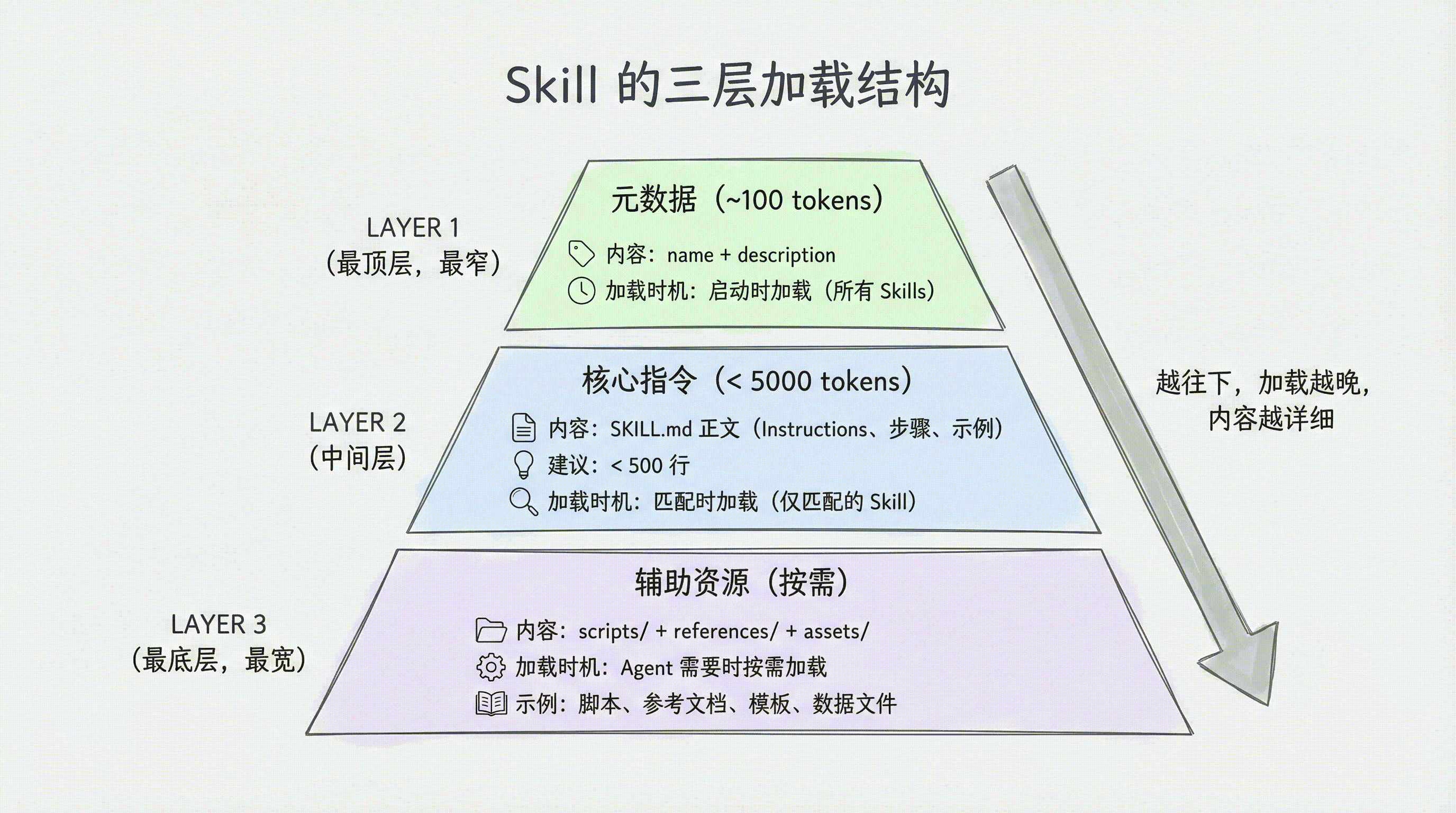
Skills 最关键的设计决策是 Progressive Disclosure(渐进式披露)——不是一次性把所有内容塞给 Agent,而是分三个层级逐步加载:
三级加载机制
| 层级 | 加载内容 | 加载时机 | 处理者 |
|---|---|---|---|
| Level 1: Metadata | name + description | Agent 启动时,所有 Skills 一起加载 | SkillsMiddleware |
| Level 2: Instructions | SKILL.md 完整正文 | 某个 Skill 被匹配激活时 | SkillsMiddleware |
| Level 3: Resources | scripts/、references/、assets/ 下的文件 | 指令中引用到某个文件时 | LLM 自行决策读取 |
工作流程:
-
启动阶段:
SkillsMiddleware扫描所有 Skill 目录,只解析每个SKILL.md的 frontmatter,提取 name 和 description。这些摘要被注入到系统提示词中。如果有 20 个 Skills,大约只占用几百 token。 -
匹配阶段:用户发送请求后,Agent 根据 description 判断是否需要某个 Skill。一旦决定使用,
SkillsMiddleware将该 Skill 的完整 SKILL.md 正文加载到上下文中。 -
执行阶段:Agent 按照正文中的指令工作。如果指令中引用了
references/或assets/下的文件,Agent 自行决定是否读取——这一步由 LLM 控制,不再由中间件干预。
匹配流程示例
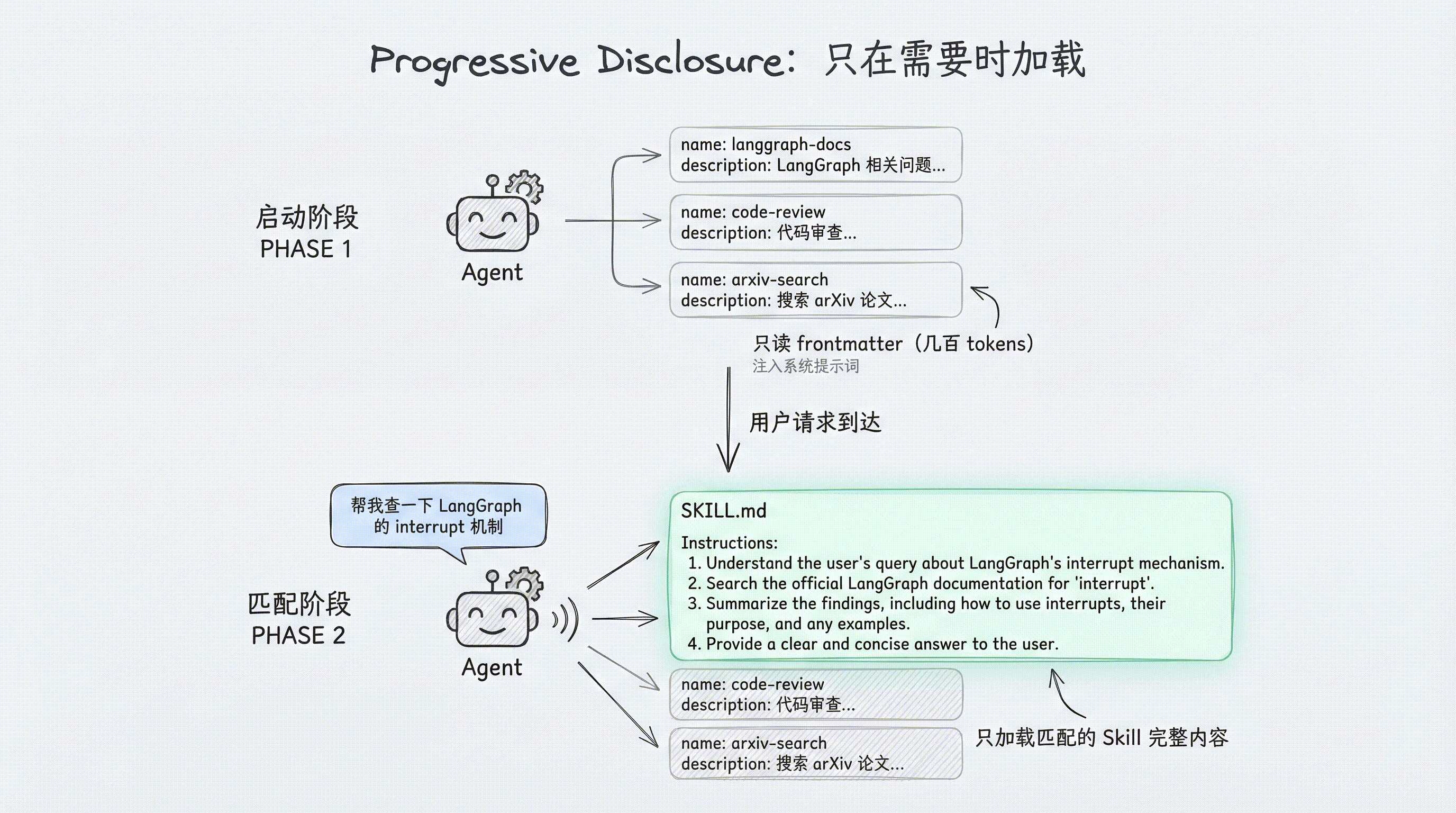
用户:"帮我查一下 LangGraph 的 interrupt 机制"

Agent 思考:
  - 扫描 Skills 列表...
  - langgraph-docs: "Use this skill for requests related to LangGraph..." ← 匹配!
  - 读取 /skills/langgraph-docs/SKILL.md 完整内容
  - 按照指令执行:fetch_url → 选择文档 → 阅读 → 回答
为什么这样设计
三个好处:
- 节省 token:20 个 Skills 启动时只加载 20 条 description(几百 token),而不是 20 份完整指令(可能数万 token)
- 精准匹配:只有当前任务真正需要的 Skill 才会被加载,避免无关指令干扰 LLM 的判断
- 无限扩展:Skill 数量从 5 个增长到 50 个,启动开销只是线性增加几十条 description,不会触及上下文窗口瓶颈
使用方式
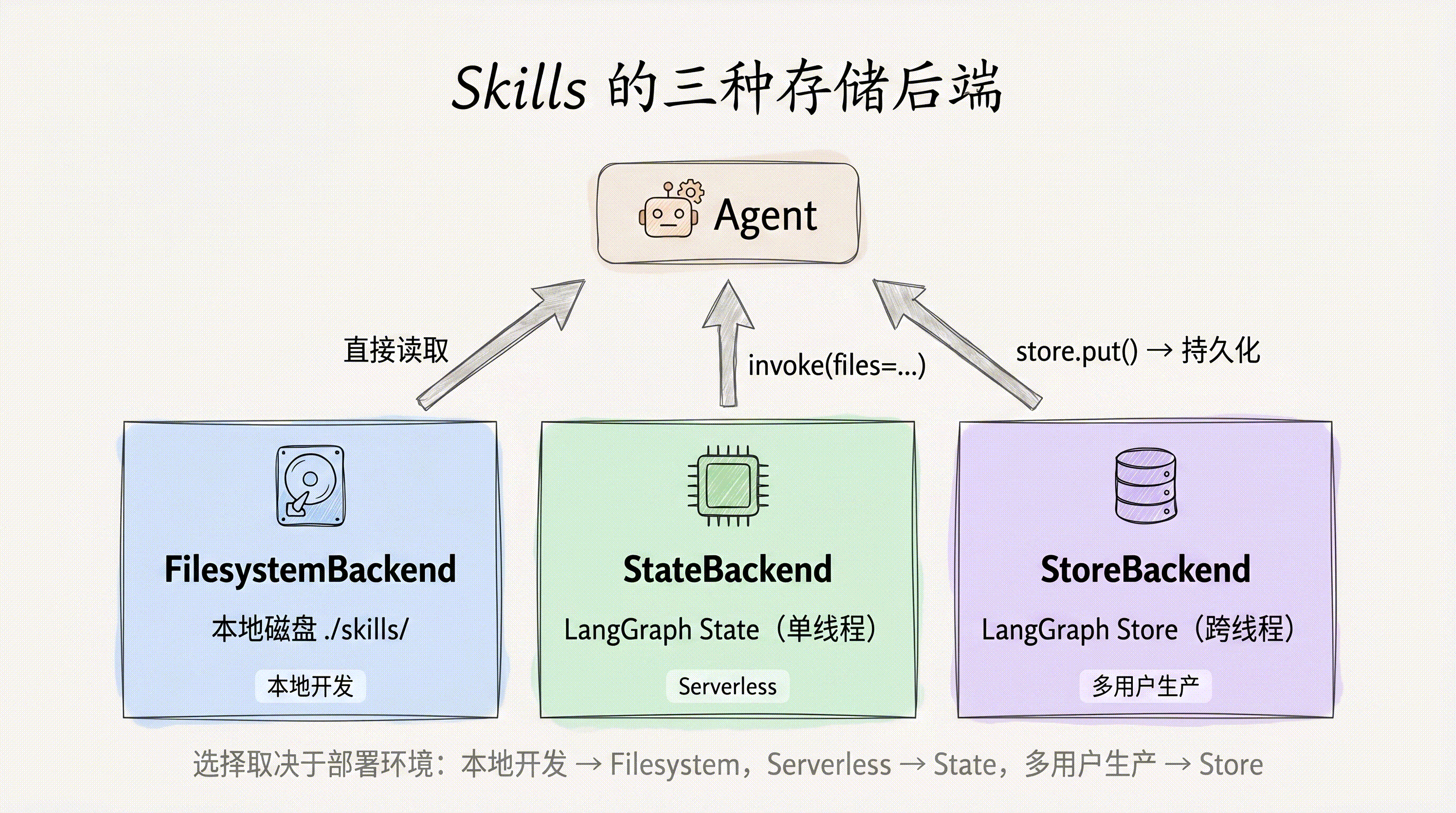
Skills 的加载方式取决于你使用的 Backend。Deep Agents 提供三种 Backend,各自对应不同的文件存储策略。下面逐一演示。
基本用法(FilesystemBackend)
FilesystemBackend 直接从本地磁盘读取 Skills 文件,适合本地开发和 CLI 场景:
from deepagents import create_deep_agent
from deepagents.backends.filesystem import FilesystemBackend

backend = FilesystemBackend(root_dir="./my-project")

agent = create_deep_agent(
    model="anthropic:claude-sonnet-4-6",
    backend=backend,
    skills=["./my-project/skills/"],
)

result = agent.invoke(
    {"messages": [{"role": "user", "content": "What is LangGraph?"}]},
    config={"configurable": {"thread_id": "1"}},
)
关键点:
skills参数接受一个路径列表,每个路径指向包含 Skill 子目录的父目录- 路径使用正斜杠(
/),相对于 Backend 的根目录 - 当多个路径中存在同名 Skill 时,后面的覆盖前面的(last wins)
StateBackend:通过 state 注入 Skills
StateBackend 将文件存储在 LangGraph 的 agent state 中。适合无磁盘环境(如 serverless 部署)或需要动态注入 Skill 内容的场景:
from urllib.request import urlopen
from deepagents import create_deep_agent
from deepagents.backends import StateBackend
from deepagents.backends.utils import create_file_data
from langgraph.checkpoint.memory import MemorySaver

checkpointer = MemorySaver()
backend = StateBackend()

# 从远程加载 Skill(也可以本地读取)
skill_url = "https://raw.githubusercontent.com/langchain-ai/deepagents/refs/heads/main/libs/cli/examples/skills/langgraph-docs/SKILL.md"
with urlopen(skill_url) as response:
    skill_content = response.read().decode('utf-8')

skills_files = {
    "/skills/langgraph-docs/SKILL.md": create_file_data(skill_content),
}

agent = create_deep_agent(
    model="anthropic:claude-sonnet-4-6",
    backend=backend,
    skills=["/skills/"],
    checkpointer=checkpointer,
)

result = agent.invoke(
    {
        "messages": [{"role": "user", "content": "What is langgraph?"}],
        "files": skills_files,  # 通过 files 参数注入
    },
    config={"configurable": {"thread_id": "12345"}},
)
关键点:
- StateBackend 没有磁盘,所有文件存储在 LangGraph agent state 中
- 虚拟路径必须以
/开头(绝对路径格式) - 必须使用
create_file_data()格式化内容——直接传入原始字符串会报错 - Skill 文件通过
invoke的files参数注入,每次调用都需要传入
StoreBackend:跨线程持久化
StoreBackend 使用 LangGraph Store 进行持久化存储。与 StateBackend 的关键区别在于:文件只需写入一次,所有线程都能访问。
from urllib.request import urlopen
from deepagents import create_deep_agent
from deepagents.backends import StoreBackend
from deepagents.backends.utils import create_file_data
from langgraph.store.memory import InMemoryStore

store = InMemoryStore()
backend = StoreBackend(namespace=lambda _rt: ("filesystem",))

skill_url = "https://raw.githubusercontent.com/langchain-ai/deepagents/refs/heads/main/libs/cli/examples/skills/langgraph-docs/SKILL.md"
with urlopen(skill_url) as response:
    skill_content = response.read().decode('utf-8')

store.put(
    namespace=("filesystem",),
    key="/skills/langgraph-docs/SKILL.md",
    value=create_file_data(skill_content),
)

agent = create_deep_agent(
    model="anthropic:claude-sonnet-4-6",
    backend=backend,
    store=store,
    skills=["/skills/"],
)

result = agent.invoke(
    {"messages": [{"role": "user", "content": "What is langgraph?"}]},
    config={"configurable": {"thread_id": "12345"}},
)
关键点:
- StoreBackend 使用 LangGraph Store 作为底层存储,数据跨线程持久化
- 文件通过
store.put()写入,而非每次invoke时传入 namespace参数是一个函数,接收 runtime config 并返回命名空间元组- 适合生产环境中多用户、多线程共享 Skills 的场景
多源 Skills 与优先级
你可以从多个目录加载 Skills。当同名 Skill 出现在多个源中时,列表中后面的覆盖前面的(last wins):
agent = create_deep_agent(
    model="anthropic:claude-sonnet-4-6",
    skills=[
        "/skills/shared/",    # 团队共享 Skills
        "/skills/project/",   # 项目专属 Skills(优先级更高)
    ],
)
这个设计支持分层覆盖:
- 团队级 Skills 放在
/skills/shared/,提供通用能力 - 项目级 Skills 放在
/skills/project/,针对当前项目定制 - 如果两个目录中都有
code-reviewSkill,/skills/project/中的版本生效
典型的分层策略:
| 层级 | 路径 | 内容 |
|---|---|---|
| 组织级 | /skills/org/ | 公司规范、安全审查 |
| 团队级 | /skills/team/ | 团队工作流、Code Review 标准 |
| 项目级 | /skills/project/ | 项目特定的部署流程、测试策略 |
运行时动态加载
skills 参数是一个普通的 Python 列表,这意味着你可以在运行时动态构造它。典型场景:根据用户角色、租户或请求类型加载不同的 Skill 集合。
from deepagents import create_deep_agent

SKILLS_BY_ROLE = {
    "engineering": ["/skills/code-review/", "/skills/testing/", "/skills/deployment/"],
    "data": ["/skills/sql-analysis/", "/skills/visualization/", "/skills/data-pipeline/"],
    "support": ["/skills/ticket-triage/", "/skills/runbook/"],
}

def create_agent_for_user(user_role: str):
    return create_deep_agent(
        model="anthropic:claude-sonnet-4-6",
        skills=SKILLS_BY_ROLE.get(user_role, []),
    )
动态加载的常见模式:
- 基于用户角色:工程师看到代码相关 Skills,数据团队看到分析 Skills
- 基于租户配置:SaaS 场景中不同客户启用不同的 Skill 包
- 基于请求上下文:根据用户输入的意图预先筛选相关 Skills
- 基于环境变量:开发环境加载调试 Skills,生产环境加载运维 Skills
这种模式的好处是:Agent 只加载与当前任务相关的 Skills,既节省 token 又减少误匹配。
Skills 与子 Agent
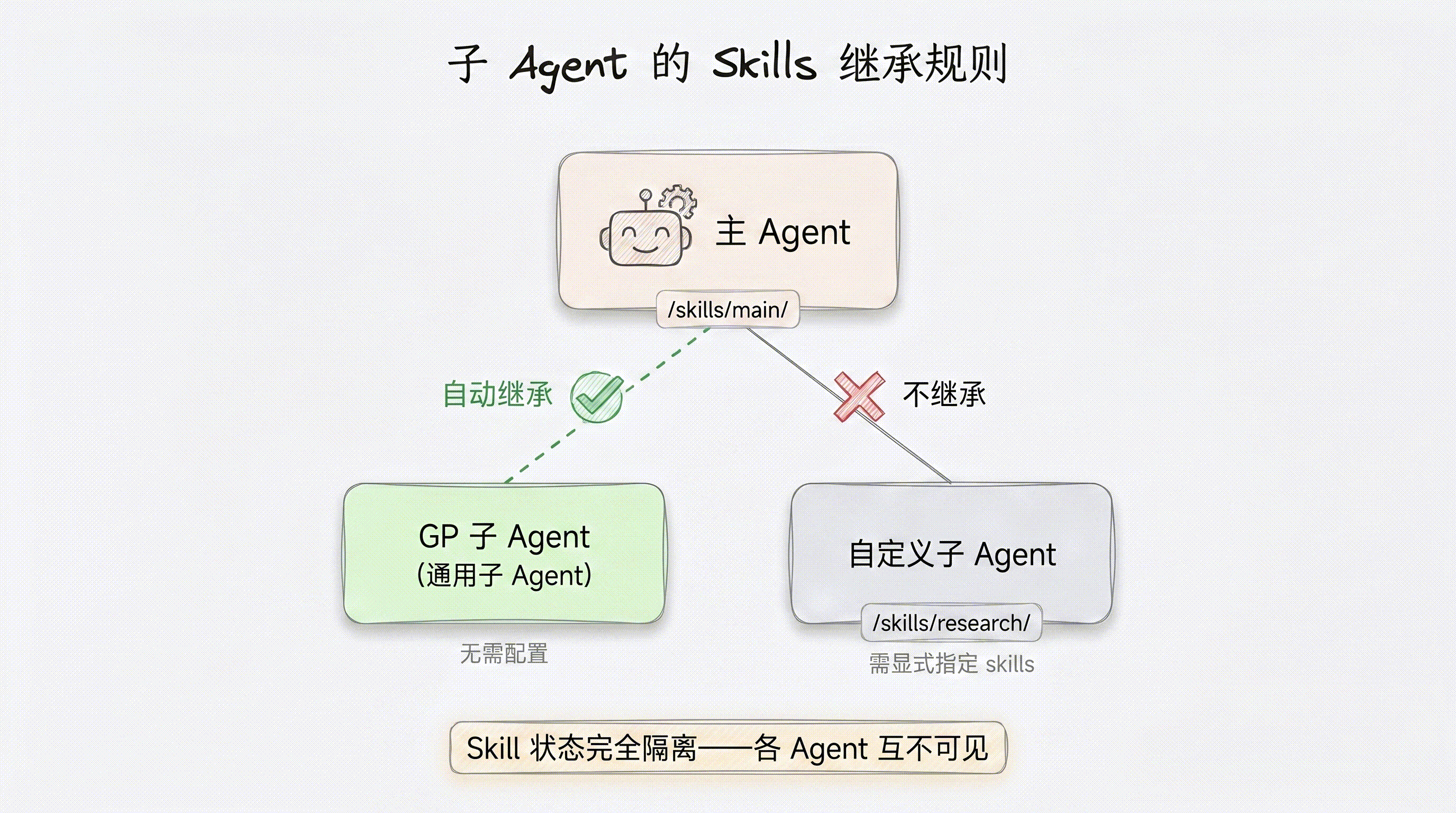
Deep Agents 支持多 Agent 协作,Skills 在主 Agent 与子 Agent 之间的继承规则如下:
- 通用子 Agent(General-Purpose Subagent):自动继承主 Agent 的所有 Skills,无需额外配置。
- 自定义子 Agent:不继承主 Agent 的 Skills,必须在定义时通过
skills字段显式指定。 - Skill 状态完全隔离:每个 Agent 拥有独立的 Skill 状态空间,一个 Agent 对 Skill 文件的修改不会影响其他 Agent。
from deepagents import create_deep_agent

research_subagent = {
    "name": "researcher",
    "description": "Research assistant with specialized skills",
    "system_prompt": "You are a researcher.",
    "tools": [web_search],
    "skills": ["/skills/research/", "/skills/web-search/"],  # 子 Agent 专属 Skills
}

agent = create_deep_agent(
    model="anthropic:claude-sonnet-4-6",
    skills=["/skills/main/"],              # 主 Agent 和 GP 子 Agent 使用
    subagents=[research_subagent],          # researcher 只有自己的 Skills
)
在这个例子中,主 Agent 挂载了 /skills/main/ 目录。当它派发任务给通用子 Agent 时,该子 Agent 也能访问 /skills/main/ 下的所有 Skill 文件。而 researcher 是自定义子 Agent,它只能使用自己声明的 /skills/research/ 和 /skills/web-search/,无法访问主 Agent 的 /skills/main/。
这种设计的好处是职责清晰:研究型子 Agent 不需要也不应该接触主 Agent 的编排类 Skill;同时状态隔离保证了并发执行时不会出现竞态条件。
Skill 权限控制
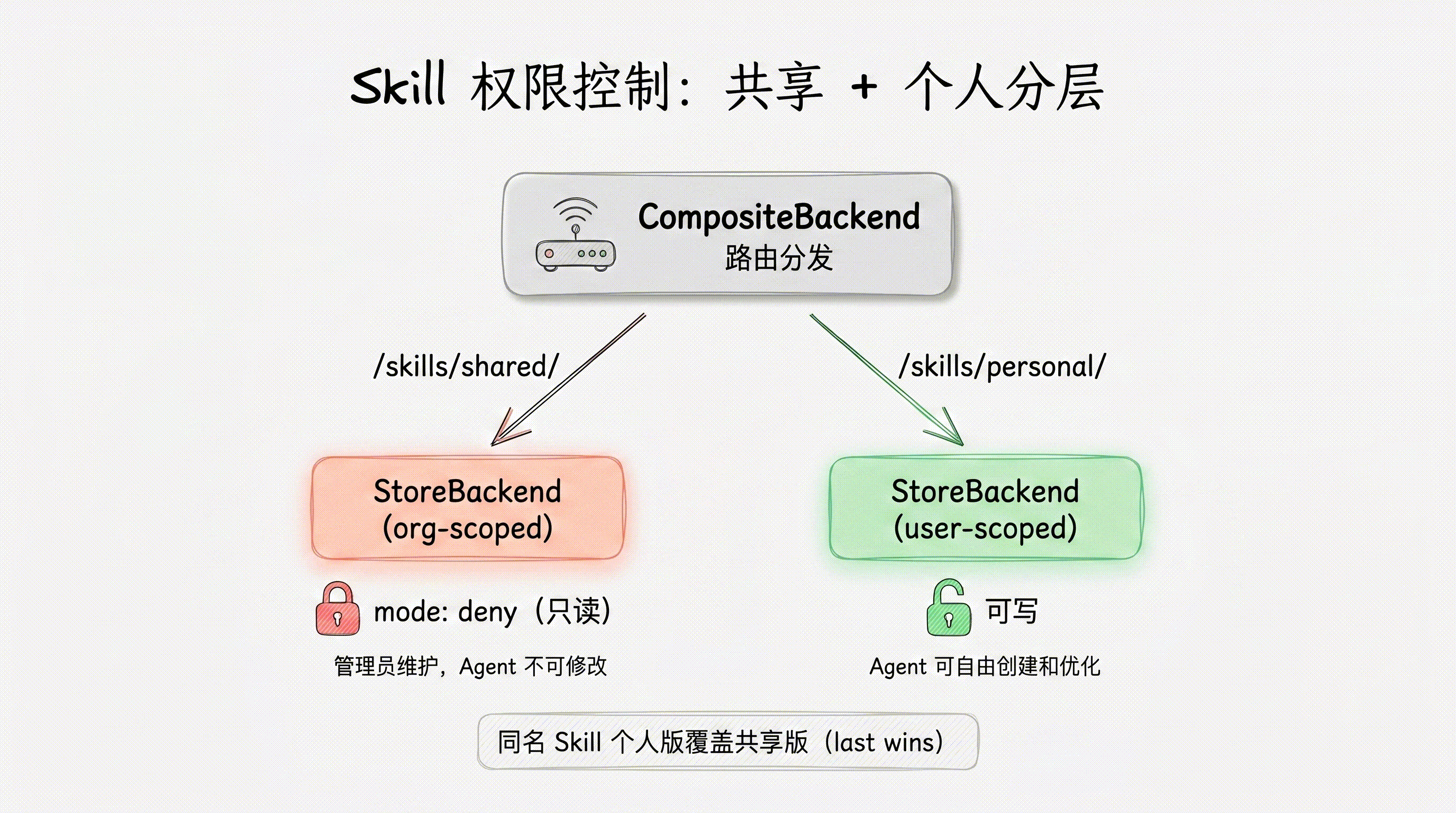
生产环境中,Skill 的权限管理需要关注三个维度:
- 可见性(Visibility):Agent 能否发现和读取某个 Skill。
- 写入权限(Write Access):Agent 能否修改 Skill 文件内容。
- 审批流程(Approval):写入操作是否需要人类确认。
只读 Skills(企业知识库场景)
企业场景中,运维团队维护一套经过审核的 Skill 库,Agent 只能读取和执行,不能擅自修改。使用 FilesystemPermission 配合 CompositeBackend 实现:
from deepagents import FilesystemPermission, create_deep_agent
from deepagents.backends import CompositeBackend, StateBackend, StoreBackend
from langgraph.store.memory import InMemoryStore

store = InMemoryStore()

agent = create_deep_agent(
    model="anthropic:claude-sonnet-4-6",
    backend=CompositeBackend(
        default=StateBackend(),
        routes={
            "/skills/": StoreBackend(
                namespace=lambda rt: ("curated-skills", rt.context.org_id),
            ),
        },
    ),
    skills=["/skills/"],
    permissions=[
        FilesystemPermission(
            operations=["write"],
            paths=["/skills/**"],
            mode="deny",
        ),
    ],
    store=store,
)核心逻辑:mode="deny" 拒绝所有对 /skills/** 路径的写入操作。Agent 可以正常发现和读取 Skill 内容,但 write_file 和 edit_file 调用会被直接拦截并返回权限错误。Skill 库的更新只能通过管理员代码直接操作 Store 完成。
写入需审批(interrupt 模式)
某些场景下,允许 Agent 提出修改建议,但需要人类审批后才能生效。mode="interrupt" 提供了这种人在回路(human-in-the-loop)的能力:
from deepagents import FilesystemPermission, create_deep_agent
from langgraph.checkpoint.memory import MemorySaver

agent = create_deep_agent(
    model="anthropic:claude-sonnet-4-6",
    skills=["/skills/personal/"],
    permissions=[
        FilesystemPermission(
            operations=["write"],
            paths=["/skills/**"],
            mode="interrupt",
        ),
    ],
    checkpointer=MemorySaver(),  # interrupt 需要 checkpointer
)
当 Agent 尝试对 /skills/** 下的文件执行写入时,执行流会暂停(interrupt),将修改内容呈现给人类审批者。审批通过后恢复执行,拒绝则回滚操作。
注意事项:
interrupt模式依赖 checkpointer 保存暂停时的状态,因此必须配置MemorySaver或其他持久化 checkpointer。- 此功能需要
deepagents>=0.6.8。 - 在 LangGraph Studio 中,interrupt 会自动渲染为审批 UI;API 调用时需要客户端轮询状态并提交审批结果。
共享 + 个人 Skills 分层
实际部署中,最常见的模式是两层结构:团队共享的只读 Skill 库 + 用户个人的可写 Skill 空间。
from deepagents import FilesystemPermission, create_deep_agent
from deepagents.backends import CompositeBackend, StateBackend, StoreBackend

agent = create_deep_agent(
    model="anthropic:claude-sonnet-4-6",
    backend=CompositeBackend(
        default=StateBackend(),
        routes={
            "/skills/shared/": StoreBackend(
                namespace=lambda rt: ("curated-skills", rt.context.org_id),
            ),
            "/skills/personal/": StoreBackend(
                namespace=lambda rt: (
                    "user-skills",
                    rt.server_info.user.identity,
                ),
            ),
        },
    ),
    skills=["/skills/shared/", "/skills/personal/"],
    permissions=[
        FilesystemPermission(
            operations=["write"],
            paths=["/skills/shared/**"],
            mode="deny",
        ),
    ],
)
这个配置实现了:
/skills/shared/路径映射到组织级 Store,写入被 deny,只有管理员能更新。/skills/personal/路径映射到用户级 Store,无写入限制,Agent 可以自由创建和优化个人 Skill。- 两个路径都在
skills列表中,Agent 启动时会同时加载两处的 Skill 文件。
同名覆盖规则:当共享库和个人空间存在同名 Skill 时,采用 last-wins 策略——skills 列表中靠后的路径优先级更高。上例中 /skills/personal/ 排在后面,因此个人版本会覆盖共享版本。这允许用户基于共享 Skill 做个性化调整,而不影响其他用户。
用 Skills 执行代码
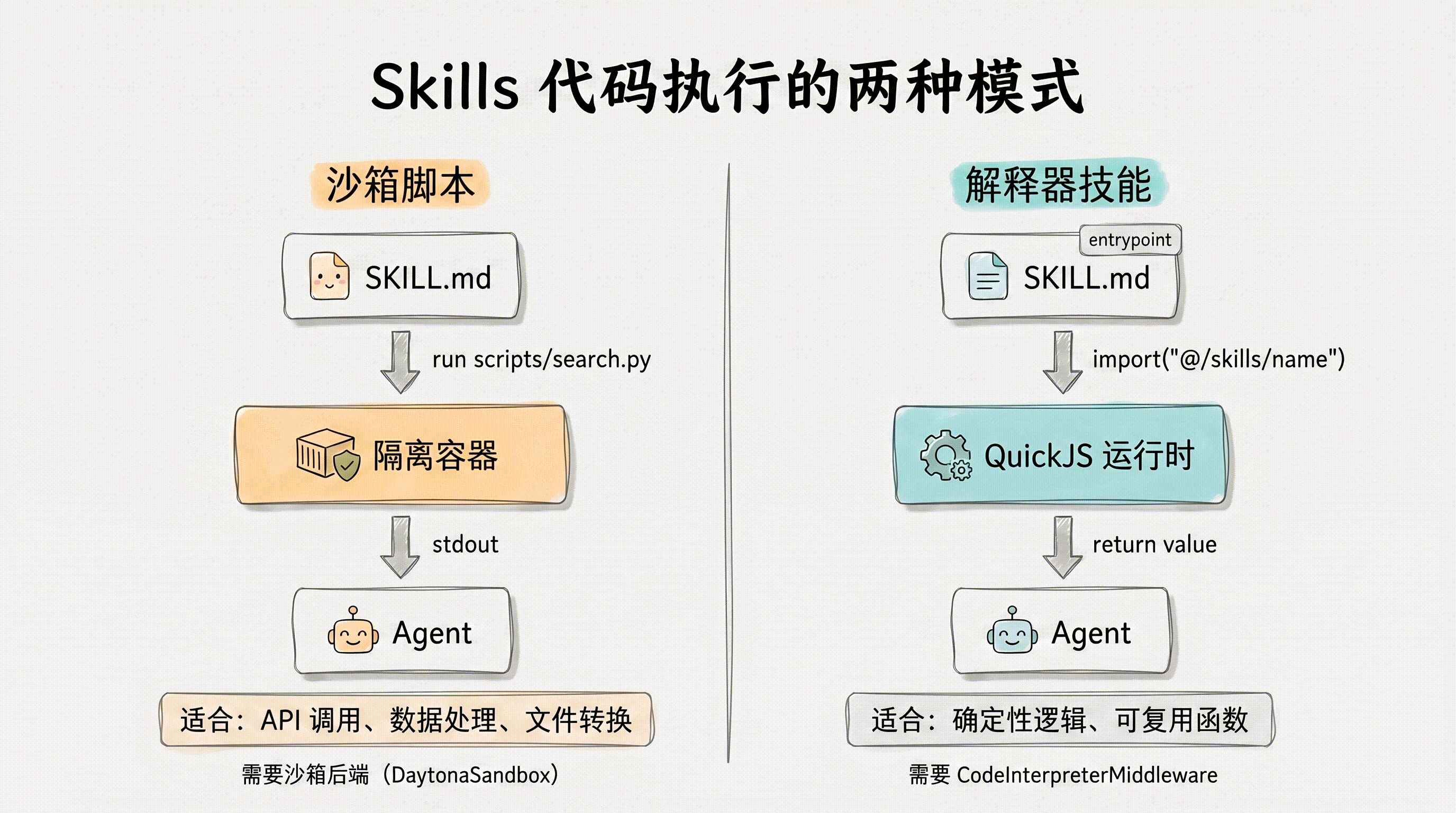
Skills 不仅能提供文本指令,还能包含可执行代码。Deep Agents 支持两种代码执行模式:沙箱脚本和解释器技能。
沙箱脚本(Sandbox Scripts)
Skills 可以在 scripts/ 目录下包含可执行脚本。Agent 可以从任何后端读取脚本内容,但要执行脚本,则需要一个支持沙箱执行的后端(如 DaytonaSandbox)。
典型的带脚本 Skill 目录结构:
skills/
└── arxiv-search/
    ├── SKILL.md
    └── scripts/
        └── search.py
对应的 SKILL.md:
---
name: arxiv-search
description: Search the arXiv preprint repository for research papers. Use when the user asks about academic papers, recent research, or scientific literature.
---

# arxiv-search

Search arXiv for papers matching the user's query.

## Instructions

1. Run `scripts/search.py` with the user's query as an argument.
2. Parse the results and present them with title, authors, abstract summary, and link.
3. If the user asks for more detail on a specific paper, fetch the full abstract.执行机制:沙箱后端(如 DaytonaSandbox)在隔离容器中运行脚本,Agent 获取标准输出作为结果。如果 Skill 文件存储在沙箱之外(比如使用 StateBackend),需要通过自定义中间件在 Agent 运行前后同步文件:
before_agent:将 Skill 脚本上传到沙箱环境after_agent:将沙箱中的输出文件下载回来
这种模式适合需要运行数据处理、API 调用、文件转换等任务的场景,同时保证了执行的安全隔离。
解释器技能(Interpreter Skills)
解释器技能将 Skill 中的代码模块暴露给 Agent 的代码解释器环境。Agent 可以直接 import 经过测试的辅助函数,而不必每次都重新生成逻辑。
要让一个 Skill 可被导入,需要三步配置:
- 在 frontmatter 的
metadata.entrypoint中指定入口文件(JS/TS) - 配置
CodeInterpreterMiddleware使用相同的后端 - Agent 在代码中通过
await import("@/skills/<name>")导入
目录结构示例:
skills/
└── order-helpers/
    ├── SKILL.md
    └── scripts/
└── index.tsSKILL.md:
---
name: order-helpers
description: Helper functions for normalizing and grouping order records.
metadata:
  entrypoint: scripts/index.ts
---

# order-helpers

Use this skill when order records need deterministic cleanup or aggregation.

Import these utilities into the REPL:

```typescript
const { groupByStatus } = await import("@/skills/order-helpers");
groupByStatus(...);
```
TypeScript 模块实现:
// skills/order-helpers/scripts/index.ts
interface Order {
  id: string;
  status: string;
}

export function groupByStatus(orders: Order[]) {
  return orders.reduce((acc, order) => {
    acc[order.status] = acc[order.status] ?? [];
    acc[order.status].push(order);
    return acc;
  }, {});
}
Agent 配置:
from deepagents import create_deep_agent
from deepagents.backends import StateBackend
from langchain_quickjs import CodeInterpreterMiddleware

backend = StateBackend()

agent = create_deep_agent(
    model="anthropic:claude-sonnet-4-6",
    backend=backend,
    skills=["/skills/"],
    middleware=[CodeInterpreterMiddleware(skills_backend=backend)],
)解释器技能的优势在于确定性——经过测试的函数不会因为 LLM 重新生成而出现偏差,同时也节省了 token(Agent 只需要写一行 import 而不是几十行实现代码)。
Skills、Memory 与 Tools 对比
Skills、Memory(AGENTS.md)和 Tools 是 Deep Agents 中三种不同的能力注入方式。它们服务于不同的目的:
| Skills | Memory(AGENTS.md) | Tools | |
|---|---|---|---|
| 用途 | 按需加载的领域能力(渐进式披露) | 启动时加载的持久上下文 | Agent 可调用的编程操作 |
| 加载时机 | Agent 判断相关时才读取 | Agent 启动时加载 | 每轮都可用 |
| 格式 | 命名目录中的 SKILL.md | AGENTS.md 文件 | 绑定到 Agent 的函数 |
| 优先级 | 后来者覆盖(last wins) | 用户级 + 项目级合并 | 创建时定义 |
| 适用场景 | 任务专属、可能很大的指令集 | 始终相关的全局规范和偏好 | Agent 需要执行操作,或没有文件系统时 |
实用决策规则:
- “所有对话都需要的” → Memory(如编码规范、语言偏好、项目架构说明)
- “特定任务才需要的专业指令” → Skills(如 LangGraph 文档查询流程、代码审查清单)
- “需要执行的原子操作” → Tools(如搜索、读写文件、发送 HTTP 请求)
值得注意的是,Skills 和 Memory 处于一个连续光谱上。Agent 可以在工作过程中更新自己的 Skills(就像更新记忆一样),因此 Skills 也可以充当渐进式披露的记忆——只在需要时才加载的领域知识库。
编写高效 Skills 的最佳实践
根据 Agent Skills 规范和实践经验,以下是编写高质量 Skills 的指南:
1. Frontmatter 保持精简
Frontmatter 中的 description 是 Agent 决定是否使用此 Skill 的唯一依据。写得具体、准确,避免泛泛而谈。
好的写法:
description: 当用户询问 LangGraph 的节点定义、状态管理、中断机制或部署配置时使用此技能。获取最新官方文档并提供代码示例。差的写法:
description: 帮助用户解决编程问题。2. SKILL.md 正文控制在 5000 tokens / 500 行以内
正文指令应当聚焦核心流程。超出部分应拆分到 references/ 目录:
skills/
└── api-design/
    ├── SKILL.md              # 核心流程(< 500 行)
    └── references/
        ├── rest-conventions.md   # 详细参考:REST 规范
        └── error-codes.md        # 详细参考:错误码定义
在 SKILL.md 中引用这些文件,Agent 会在需要时按需加载。
3. 为 Agent 而非人类写结构
Agent 擅长执行清晰的步骤化指令。Skill 内容应当包含:
- 步骤化流程:明确的 1-2-3 步骤,而非段落式描述
- 决策标准:遇到分支时如何选择(if X then A, else B)
- 输入/输出示例:展示期望的输入格式和输出格式
- 边界情况处理:常见异常如何应对
4. 管控 Skill 数量
少量定义清晰的 Skills 优于大量定义模糊的 Skills。当 Skill 数量过多时:
- Agent 需要在更多 description 中做选择,容易误匹配
- 重叠的 Skill 会让 Agent 困惑该用哪个
建议:定期审查 Skills 列表,合并重叠的、删除过时的、拆分过大的。
小结
本章我们深入学习了 Deep Agents 的 Skills 机制,核心要点:
- Skills 结构:一个目录 +
SKILL.md+ 可选的 scripts/references/assets,遵循开放的 Agent Skills 规范,可跨框架复用 - Progressive Disclosure 三级加载:元数据(启动时)→ 指令正文(匹配时)→ 辅助资源(按需),最大化 token 效率
- 三种存储后端:StateBackend(通过 files 参数注入)、StoreBackend(持久化存储)、FilesystemBackend(直接读磁盘)
- 子 Agent 继承规则:General-purpose 子 Agent 自动继承主 Agent 的 Skills,自定义子 Agent 需显式配置,状态完全隔离
- 权限控制:deny 模式完全禁止、interrupt 模式人工审批,适用于生产环境的安全部署
- 代码执行:沙箱脚本在隔离容器中运行外部脚本,解释器技能让 Agent 直接 import 经过测试的代码模块
- Skills vs Memory vs Tools:三者各司其职——Skills 是按需加载的领域知识,Memory 是始终生效的全局上下文,Tools 是可执行的原子操作
下一章,我们将学习沙箱执行——让 Agent 在安全隔离的环境中运行代码。